

Back to Case Studies
Secure Digital Vault Verified Project Privacy-Protected Demo

Lee's Password Manager

A Lifetime of Passwords. One Secure Vault.

We replaced a lifetime of paper password notebooks with a secure, senior-friendly digital vault — encrypting 400+ logins, cards, and contacts in one simple app. Fully custom, AES-256 encrypted, and designed around a familiar notebook interface the client already trusts.

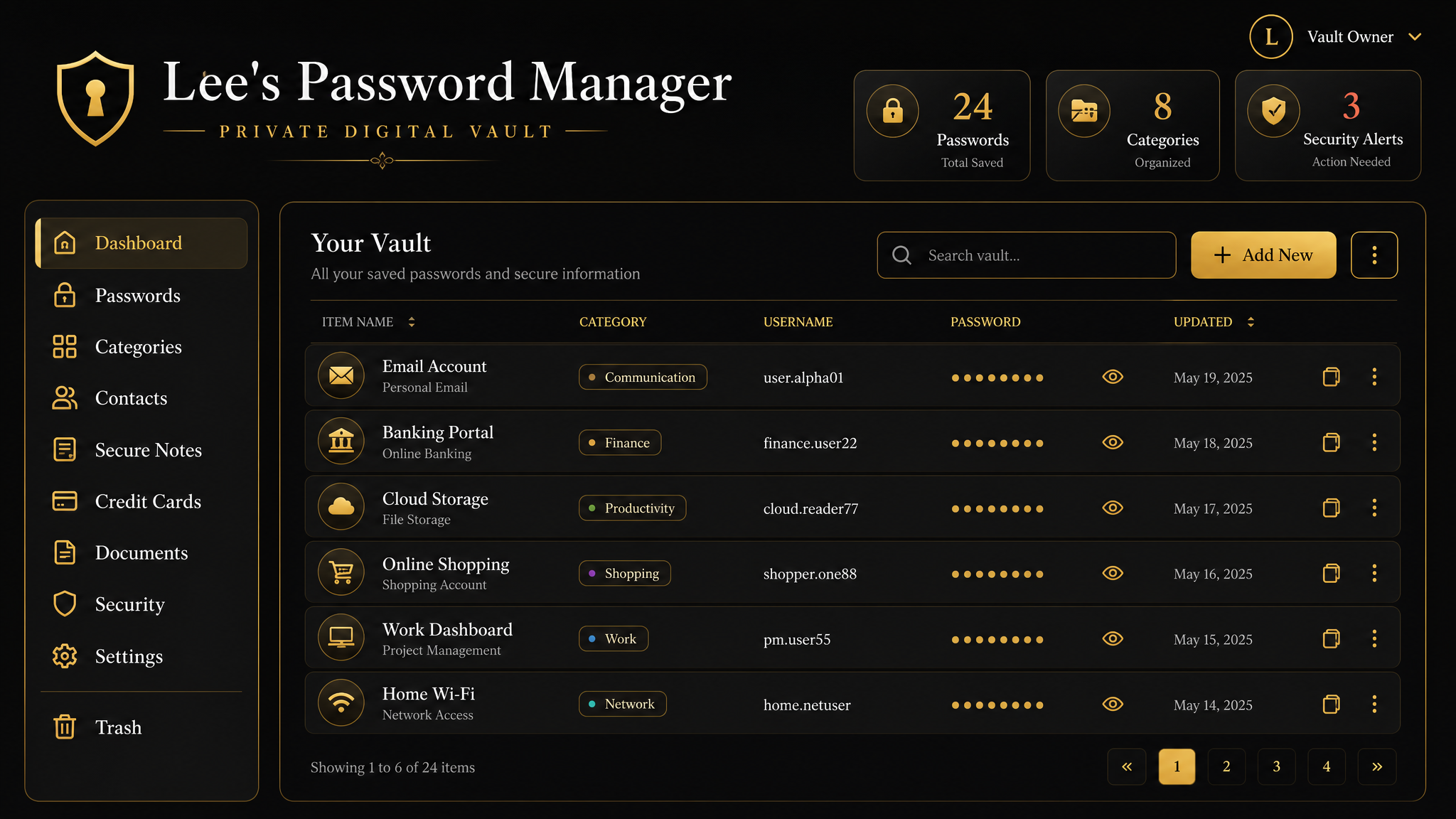
Lee's Password Manager secure digital vault — illustrative mockup with sample data only
Illustrative mockup — sample data only

Project

Lee's Password Manager

Client

Dr. Curtis Lee

Industry

Personal Productivity / Digital Security

Location

Goldsboro, NC

Client Type

Individual / Senior user (80+)

System Type

Secure encrypted web app (personal vault & digital notebook)

Estimated Retail Value

$14,875 (up to $30,625)

Client Investment

$3,600

01The Challenge

What was broken before the vault

Hundreds of passwords lived in handwritten notebooks — disorganized and impossible to search quickly.

Sensitive logins, cards, and contacts sat completely unprotected on paper, one accident away from being lost forever.

Mainstream password managers were far too complex and intimidating for an 80+ year-old user.

There was no secure backup — a lost or damaged notebook meant losing a lifetime of accounts.

Finding a single login meant flipping through pages by hand, taking minutes every time.

Credit card numbers, PINs, and CVVs were written in plain text with no protection whatsoever.

02Our Solution

The system we built

We built a fully custom encrypted digital vault designed around a familiar notebook interface — nothing generic.

Digitized 400+ handwritten credentials using AI-assisted text extraction for fast, accurate migration.

Secured every entry with AES-256-GCM encryption so sensitive data stays protected at rest.

Added instant full-text search, A–Z navigation, and category filters so any login is found in seconds.

Built encrypted credit card and contacts modules so cards, PINs, and people live in the same secure place.

Tuned the entire experience for accessibility — large text, paper themes, light/dark mode, and self-service reset.

03Key Features

Everything in one secure notebook

AES-256-GCM Encrypted Vault

Every password, card, and contact is encrypted at rest with bank-grade AES-256-GCM encryption.

Notebook-Themed Interface

A warm, familiar notebook design that feels natural to a paper-and-pen generation — senior-friendly by default.

AI-Assisted Migration

400+ handwritten credentials digitized accurately using AI-powered text extraction from notebook pages.

Search, A–Z & Categories

Full-text search, A–Z navigation, and category filters make any entry findable in seconds.

Reveal & One-Click Copy

Passwords stay masked until needed, with on-demand reveal and one-click copy for effortless use.

Built-In Password Generator

Create strong, unique passwords on the spot — no need to invent or reuse weak ones.

Encrypted Card Manager

Store card numbers, CVVs, and PINs securely — encrypted, masked, and ready when needed.

Contacts Directory

An organized, category-based contacts directory keeps important people right alongside logins.

Live Dashboard Counts

At-a-glance totals for passwords, contacts, and categories so the whole vault is visible instantly.

Accessibility Settings

Adjustable text size and paper themes tuned for comfortable reading at any age.

Light / Dark Mode

Switch between light and dark themes for comfortable viewing in any setting.

Self-Service Password Reset

A simple security-question reset lets the client regain access independently — no tech support call needed.

1-Hour Auto-Logout

Sessions time out automatically after an hour of inactivity so an open device never stays exposed.

Fully Responsive

A seamless experience across mobile, tablet, and desktop — the vault travels everywhere.

04The AI Layer

AI that did the heavy lifting — then stepped aside

The AI worked only during the one-time migration — reading handwritten pages and turning years of paper into clean, structured data. From there, smart engineering keeps the vault fast and secure. Critically, private credentials are never sent to any AI service; they stay encrypted inside the vault.

AI-Powered Text Extraction

AI read years of handwritten notebook pages during a one-time migration, turning paper into structured, accurate, searchable data — hundreds of entries without manual retyping.

Multi-Format Encryption Handling

Smart engineering automatically recognizes and handles three different encryption formats behind the scenes, unifying legacy data into one consistent, secure system.

Lazy On-Demand Decryption

Entries are decrypted only at the moment they are viewed — keeping the vault fast to load and minimizing how long sensitive data is ever in the open.

Automatic Organization

New entries are sorted and categorized automatically, so the vault stays clean and navigable without any manual filing.

05Before vs. After

The transformation

Area
Before
After
Storage
Handwritten paper notebooks
Encrypted digital vault
Security
Plain text, sitting on paper
AES-256-GCM encryption
Finding a login
Flipping pages for minutes
Instant search in seconds
Backup
None — one accident from total loss
Secure, always-available vault
Card details
Written in the clear
Encrypted card manager
Usability
Complex apps or paper only
Notebook-style, senior-friendly UI
Access
Anyone could read the notebook
Private login + 1-hour auto-logout
06Results & Metrics

Measurable impact

413

Passwords stored

Digitized and encrypted from paper

54

Contacts organized

In a searchable, categorized directory

14

Categories

Auto-organized across the vault

100%

Sensitive data encrypted

AES-256-GCM at rest

3

Legacy formats unified

Merged into one clean system

Seconds

Lookup time

Down from minutes of page-flipping

07Platform Screenshots

Inside the vault

For privacy and security, real screenshots are withheld until they are fully scrubbed of any passwords, card numbers, names, and credentials. Below is a preview of each view — explore the full interactive demo with sample data anytime.

08Investment vs. Value

Premium system, fraction of the cost

Client Investment

$3,600

Estimated Retail Value

$14,875+

Value Delivered

4x return

The client received a fully custom, AES-256 encrypted digital vault — with AI-assisted migration of 400+ credentials, an encrypted card manager, a contacts directory, and a senior-friendly notebook interface — for a $3,600 investment against an estimated $14,875+ retail build cost (up to $30,625 at agency rates). Roughly 175 development hours of custom software, delivered for a fraction of market price.

09Who This System Is For

Built for people moving from paper to secure digital

Seniors and the families or caregivers who help them

Estate and legacy planning — keeping accounts findable and secure

Small business owners and trades professionals juggling many logins

Privacy-conscious individuals who want a private, custom vault

Anyone moving from paper records to a secure digital system

People who want a simple system built around how they actually work

Want a secure system built around how you actually live?

We map where your time, security and records are leaking — then design the custom system that fixes it. Start with a free workflow diagnosis.